Audio & video to text

Turn any audio or video file into searchable, exportable text.

Drop a podcast, interview, lecture or video onto your Mac and get an accurate, editable transcript. Subtitles, notes and a searchable archive included. Everything runs on your Mac. Nothing is uploaded.

Download on the Mac App Store

Free to download. Unlock Pro with a one-time purchase, no subscription. The App Store always shows the current price before you buy.

Drop a file, let it transcribe on your Mac, then edit and export. No cloud round-trip.

What it does for you

The transcript is just the start. Here is what you actually get.

Real outcomes for the people who turn recordings into work every day. The features behind each one are listed underneath.

Your recordings stay private

Every file is transcribed on your Mac, so sensitive interviews, client calls and unreleased episodes never leave your computer. There is no account to create and nothing is ever sent to a server.

  • 100% on-device transcription
  • No account, no sign-in
  • Nothing uploaded to the cloud

Turn one recording into everything you need

The same transcript becomes publish-ready subtitles for your video, a clean document for a client, and quick notes for yourself. No copy and paste between five different tools.

  • SRT and VTT subtitles
  • Export to DOCX, PDF, Markdown, HTML, CSV, JSON
  • One-click copy of clean text

Find any moment, even months later

Every transcription is saved to a searchable archive. Look up an exact quote by keyword, or simply describe what was said and let meaning-based search surface it for you.

  • Full-text keyword search
  • Semantic, meaning-based search
  • Persistent, private history

Built for real recordings, not just short clips

Drop a two-hour podcast or a full lecture and get a reliable transcript from start to finish. Line up a whole folder of files and let your Mac work through them while you do something else.

  • Reliable multi-hour files
  • Batch processing
  • 57 transcription languages

Pay once, and it is yours

No subscription, ever. A single upgrade unlocks everything, and transcription quality is never held back to push you toward paying. The free tier uses the same engine as Pro.

  • One-time Pro upgrade
  • No monthly fee
  • Full quality, even for free

A closer look

Designed to feel right at home on the Mac.

Native, fast and uncluttered, built around your files.

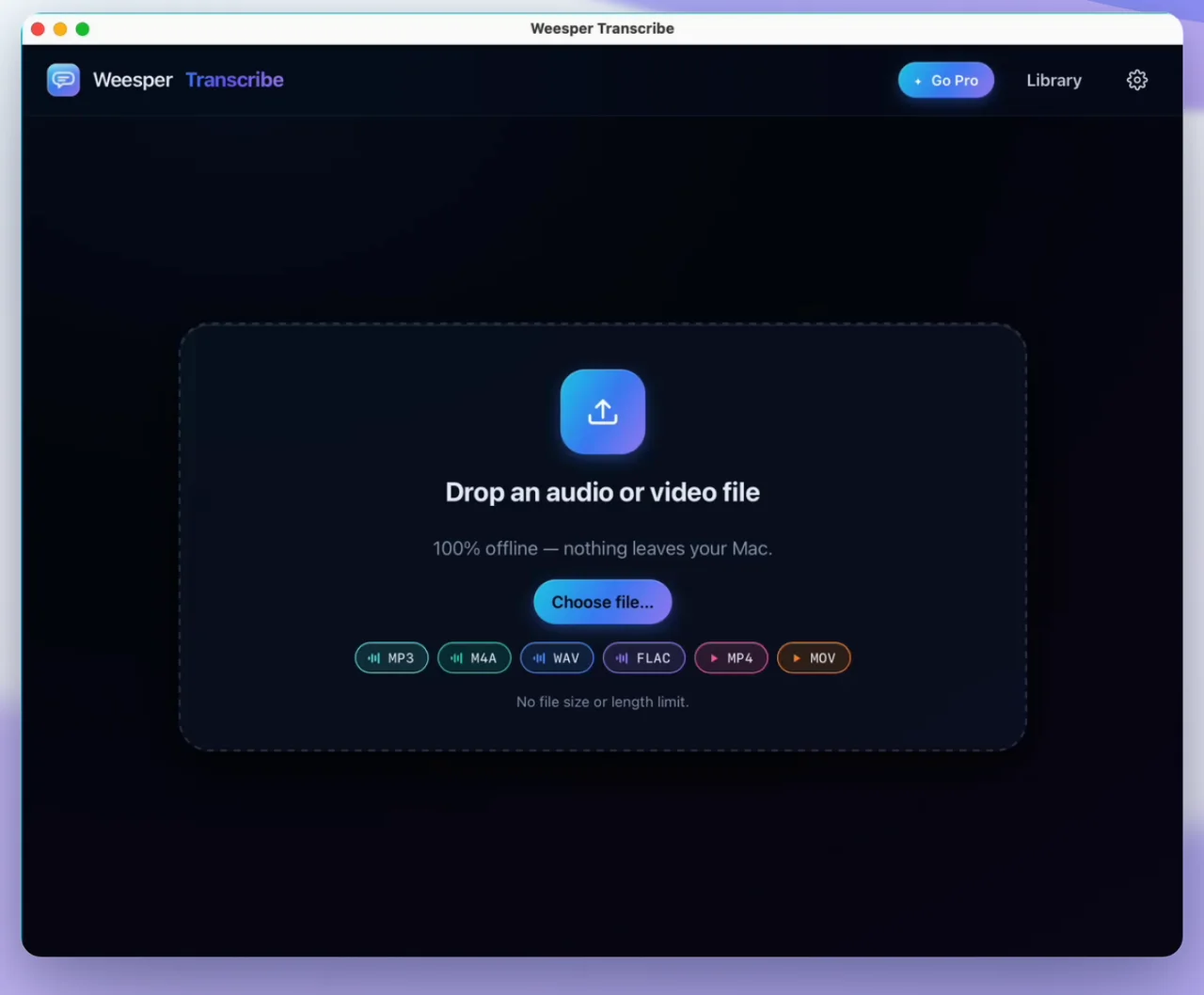
Drop an audio or video file into Weesper Transcribe
Drop a file, audio or video, in any common format.
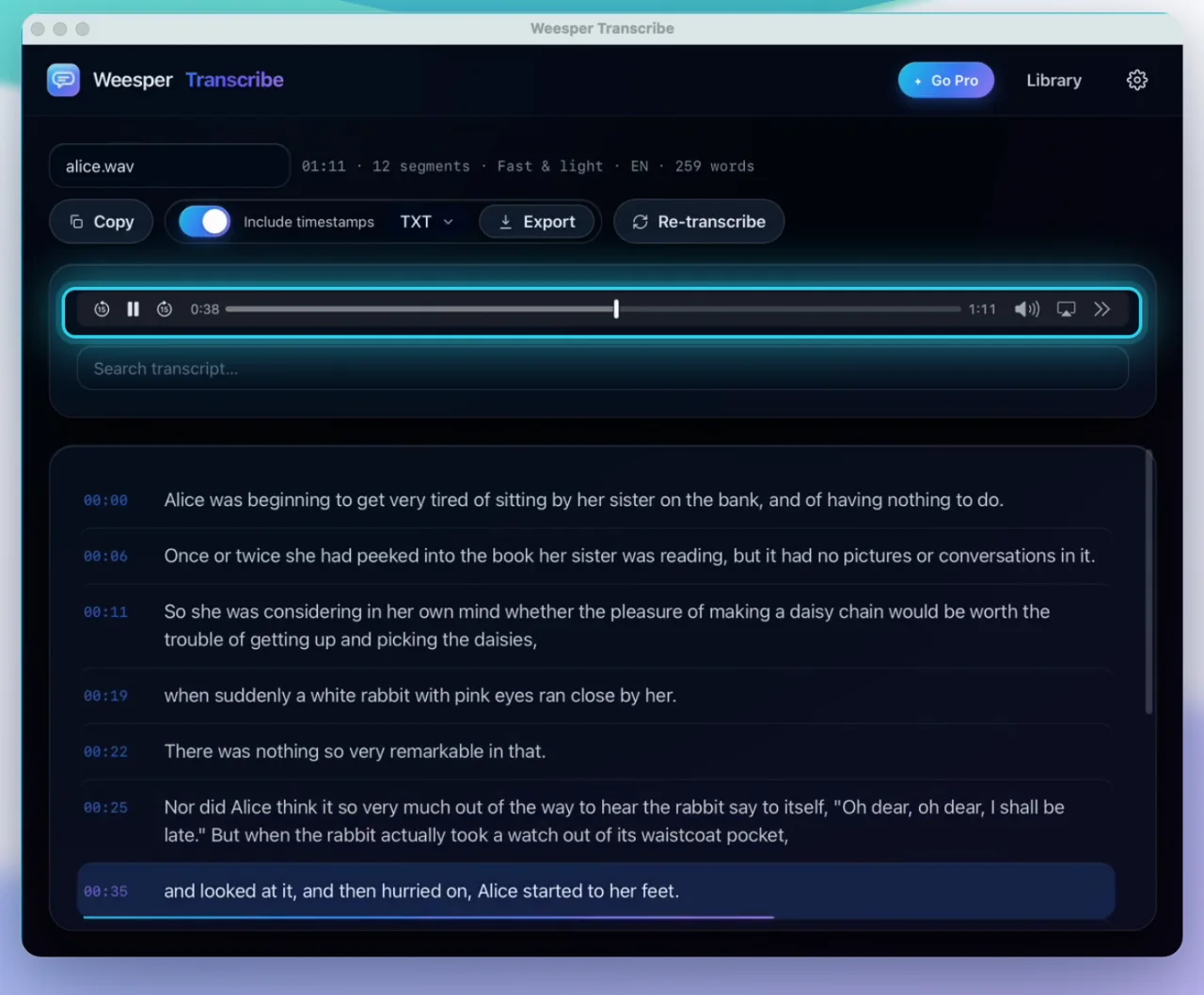
An editable transcript with clickable timestamps in Weesper Transcribe
Read, edit and jump to any moment with clickable timestamps.
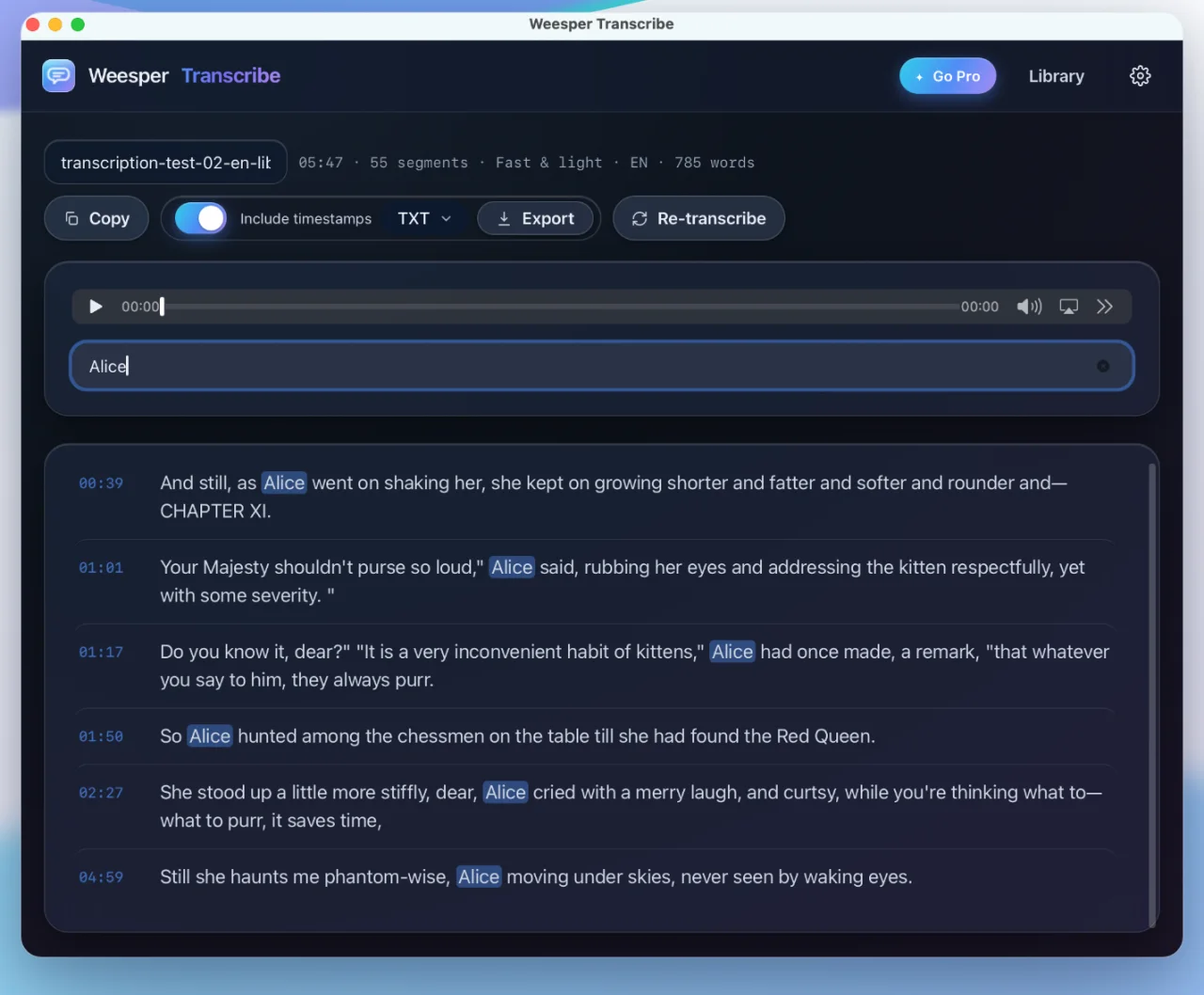
Searching the transcription history in Weesper Transcribe
Search your whole history by keyword or meaning.
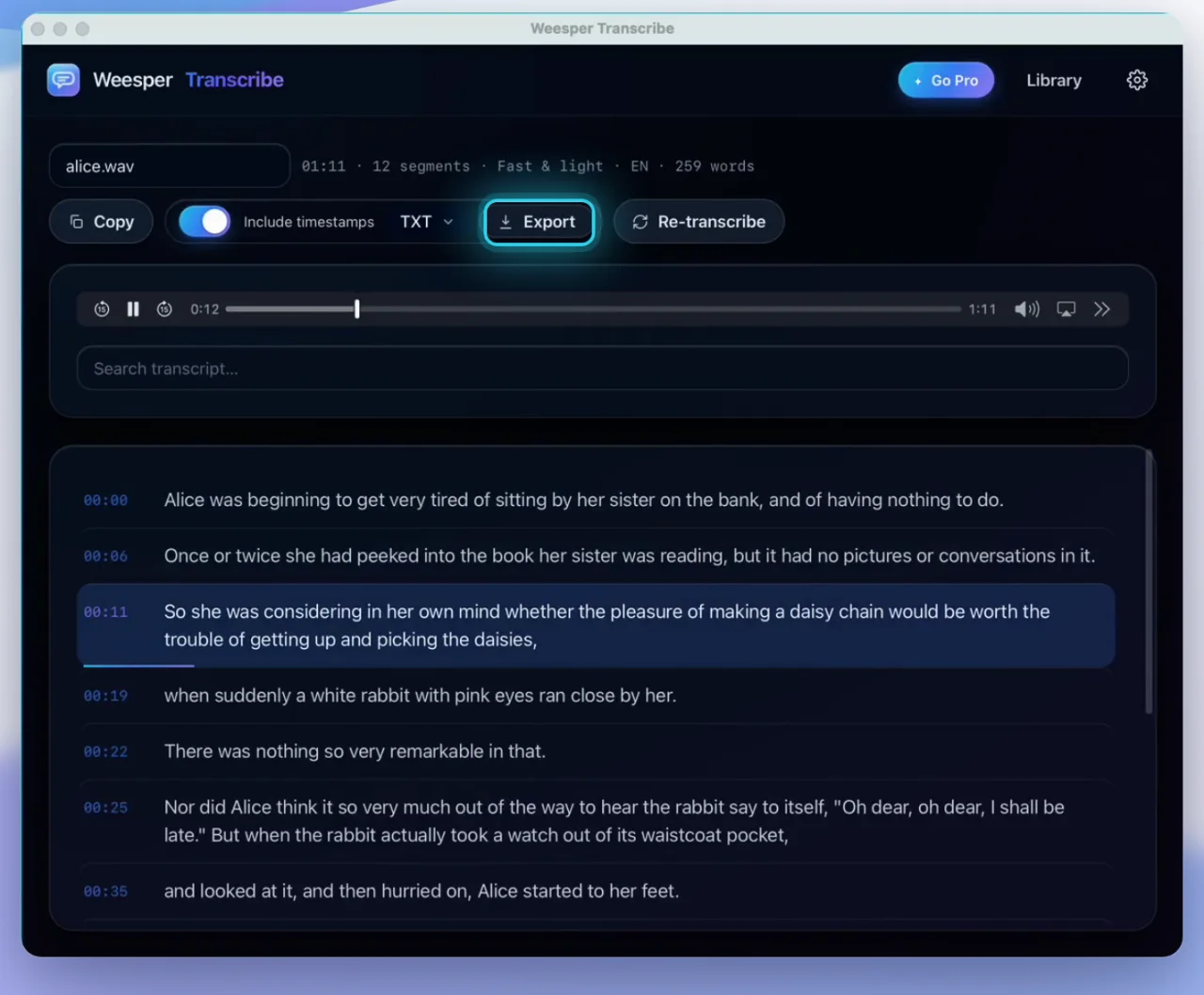
Exporting subtitles and documents from Weesper Transcribe
Export subtitles, documents and notes in nine formats.

Who it is for

Made for people who already have recordings.

Use it after the recording, wherever spoken words need to become text.

Podcasters

Turn long episodes into show notes, searchable archives and quotable highlights in minutes.

Video creators

Generate accurate SRT or VTT subtitles from any video file before you publish.

Journalists and researchers

Keep sensitive interviews private, searchable and easy to quote. Nothing leaves your Mac.

Students and academics

Convert lectures, seminars and recorded readings into notes you can search and revise.

Teams and professionals

Get clean records of meetings and calls without sending audio to a third-party cloud.

Simple workflow

Drop, transcribe, reuse.

The product stays intentionally small: convert your existing media into useful text, fast.

  1. 1. Add a file Drag any audio or video file into the Mac app.
  2. 2. Review the transcript Edit the text, search it and keep it in your searchable history.
  3. 3. Export what you need Copy the text or export subtitles, documents and notes in nine formats.

Why it exists

A MacWhisper alternative with a Weesper angle.

On-device transcription is table stakes. The real difference is a focused Mac workflow: a one-time upgrade instead of a subscription, reliable long-file handling, a searchable transcript history, and the same private, on-device philosophy as Weesper Neon Flow.

  • One-time Pro upgrade, no subscription
  • Files, not live dictation
  • Searchable history across every transcript
  • Private by design: content stays on your Mac

Weesper ecosystem

Weesper Neon Flow is for what you say now. Weesper Transcribe is for files you already have.

The two apps feed each other. Dictate new text anywhere with Weesper Neon Flow, then transcribe podcasts, meetings and videos with Weesper Transcribe. Same on-device engine, same privacy.

Full feature list

Everything inside Weesper Transcribe.

For the power users who want the complete picture.

  • On-device engine Audio and video transcribed locally with Metal acceleration on Apple Silicon.
  • Any common format MP3, WAV, M4A, MP4, MOV and any other file macOS can read.
  • Nine export formats TXT, Markdown, SRT, VTT, DOCX, PDF, HTML, CSV and JSON.
  • Subtitles Time-coded SRT and VTT, ready to drop into your video editor.
  • Keyword search Full-text search across your entire transcript history.
  • Semantic search Find passages by meaning, even across languages.
  • 57 languages Transcribe in the language of the source recording.
  • Long-file support Multi-hour recordings handled reliably, not just clips.
  • Batch processing Queue a folder of files and process them in sequence.
  • Inline editing Fix text directly in the transcript, saved automatically.
  • Clickable timestamps Jump straight to any moment in the original audio.
  • Auto-save Send every finished transcript to a folder of your choice.
  • Local automation API Send audio from your own tools and get text back, on your Mac.
  • Universal app Runs on Apple Silicon and Intel Macs, macOS 13 or later.

Questions before downloading

Is Weesper Transcribe a live dictation app?

No. Weesper Transcribe is for existing audio and video files. For live dictation into any text field, use its sister app, Weesper Neon Flow.

Does my audio leave my Mac?

No. Transcription runs on your Mac. Your media files and transcripts are processed locally and are never uploaded to Weesper.

What can I export?

Plain text, Markdown, SRT and VTT subtitles, DOCX, PDF, HTML, CSV and JSON. Nine formats in total.

Is Pro a subscription?

No. Pro is a one-time lifetime purchase through Apple's App Store. There is no monthly fee, and transcription quality is never throttled.

Is there a free version?

Yes. The app is free to download and transcribes files up to 15 minutes at full quality. Pro removes the length limit and unlocks batch processing, pro exports, editing and search.

Does it work on Intel and Apple Silicon Macs?

Yes. Weesper Transcribe is a universal app and runs on both Apple Silicon and Intel Macs (macOS 13 or later).

How many languages does it support?

Transcription supports 57 languages, and the app interface is localized in 13 languages.

Try it with a real file.

Start with one podcast, interview, lecture or video. If it saves you editing time, the app has done its job.