

Write more in less time
- Dictate up to 3x faster than typing
- Draft emails and updates in one pass
- Capture notes while the thought is fresh
- Spend less of the day at the keyboard
100% offline voice dictation for Mac and Windows
Hold a shortcut, speak naturally, and clean text appears at your cursor in Gmail, Slack, Notion, Word and other desktop apps.
Hi Maya thanks for reviewing the revised brief I'll send the final version this afternoon
Hi Maya, thanks for reviewing the revised brief. I'll send the final version this afternoon.
Illustrative example. No microphone access.
01
Use Weesper Neon Flow in Gmail, Slack, Notion, Microsoft Office, browsers, messaging apps, and other supported text fields, with no app-by-app setup.
02
Hold your chosen keyboard shortcut
A discreet HUD appears to confirmSay what you want to write
Weesper runs Whisper on your Mac or Windows PC and keeps speech recognition on-device.Your cleaned-up text appears at the active cursor.
Punctuation and capitalization are cleaned up; common filler words can be removed.03
04
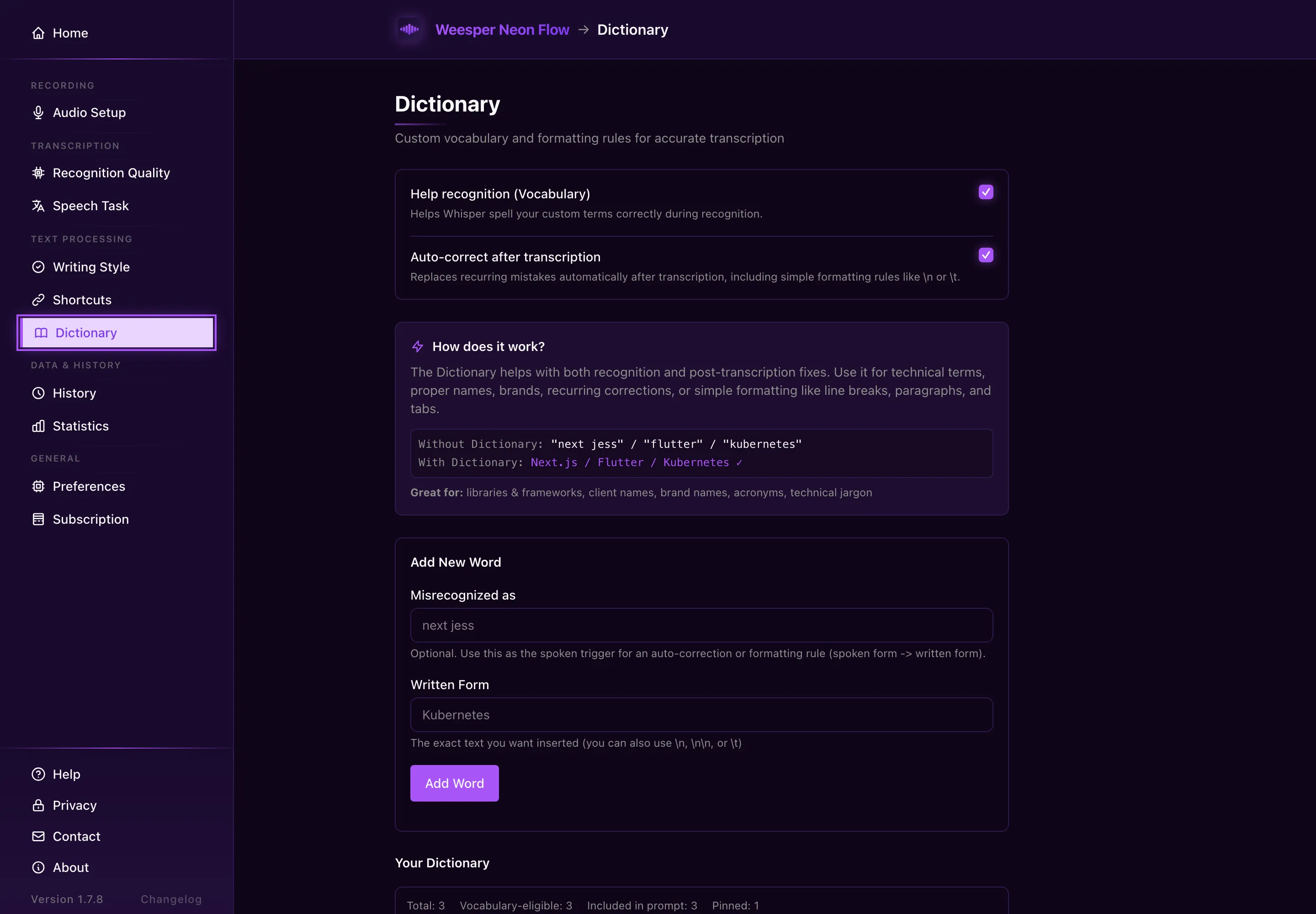
Actual Weesper Neon Flow interface: personal dictionary.
05
06
Draft detailed emails and project updates without starting from a blank page.
Turn spoken explanations into developer documentation.
Use custom dictionaries for legal and other specialist terms.
Speak in French and produce English text for international clients.
Capture a first draft in your own voice, then edit it.
Keep writing when a keyboard is uncomfortable or difficult to use.
07
Feedback from public reviews and support conversations we can verify.
By far the best speech-to-text application I found around.
Giulio C.macOS user · Italy
I really appreciate having a European local data privacy solution compared to all these US-based data collectors. Everything stays on my machine — exactly what I needed.
Verified userDesktop user · Germany
I will certainly stay with Weesper, and I look forward to the new toggles.
Verified userDesktop user
08
All plans include a 15-day free trial. No credit card required.
7-day money-back guarantee
Pays for itself in 20 months vs monthly
Pay once, own forever.
€3.75/month
3 months free
Save 25%. Mac + Windows.
No commitment. Cancel anytime.
Choose Monthly, Annual, or Lifetime in the app after your 15-day trial.
Already installed? Open Weesper Neon Flow → Subscription → Choose a plan. Secure Stripe Checkout opens in your browser.
A: Yes! 15 full days, all features unlocked. No credit card required.
A: If you like Weesper Neon Flow, choose your plan: €5/month, €45/year (save 25%), or €99 one-time. Otherwise, the app switches to the Free Plan with a 1,500-word weekly limit (your data stays on your computer).
A: Yes. A personal Direct license covers up to 3 of your own Mac or Windows computers. It is for one person and cannot be shared.
A: No. The price shown is the price you pay. No additional fees, no "Premium Plus" version.
A: Yes. If Weesper Neon Flow is not a fit, contact us within 7 days of purchase for a full refund. Abuse and chargeback cases are reviewed manually.
A: Yes. Cancel anytime from your settings. Your plan stays active until the end of the billing period.
A: Download the app for free, try all features for 15 days, then choose your plan directly from the app settings.
09
10
| Feature | Weesper Neon Flow | Wispr Flow | Dragon NaturallySpeaking | Siri / macOS Dictation | Google Docs Voice Typing |
|---|---|---|---|---|---|
| Price | From €5/month | $12/month (Free: 2000 words/week) | €300 (license) | Free | Free |
| Offline | Yes | No (cloud) | Yes | No (cloud) | No (cloud) |
| Auto insertion | Yes (everywhere) | Yes (everywhere) | Yes | Limited | No (Google Docs only) |
| Post-processing | Intelligent | Intelligent (AI auto-edits) | Basic | No | Basic |
| Multi-language | 50+ | 100+ | Limited | Yes | Yes |
| Multilingual transcription | Yes | Yes | No | No | No |
| Contextual prompts | Yes | Yes (Command Mode) | No | No | No |
| Privacy | On-device dictation | Cloud (SOC 2, HIPAA) | Local | Apple Cloud | Google Cloud |
| Text shortcuts | Yes | Yes | No | No | No |
| Platform | macOS + Windows | macOS + Windows + iOS | Windows only | macOS only | Web only |
Weesper Transcribe turns recordings into editable text on your Mac, offline. Free for files up to 15 minutes; Pro is a one-time purchase.
11
A: macOS 13+ (Ventura) or Windows 10/11. 4 GB RAM minimum. Works on Apple Silicon, and on Intel or AMD processors with AVX2 support (Intel Haswell 2013 or later, AMD 2015 or later).
A: No. Dictation works 100% offline: speech recognition and dictated text never leave your computer. Internet is only needed for the essentials:
A: About 600 MB with the Small model (default, 512 MB). The Medium model is 1.5 GB, Large 3.2 GB.
A: No! Weesper Neon Flow works immediately, no training needed. The more you use it, the more you learn to speak clearly (not the other way around).
A: Weesper works in supported text fields across Gmail, Slack, Notion, Word, browsers, and many other apps. Target-app permissions or unusual editors can affect insertion.
A: Yes! Configure your main language + secondary languages. Weesper Neon Flow automatically detects the language you're speaking. You can even speak in one language and get the transcription in another.
A: Contextual prompts guide the transcription style based on your activity. Examples:
A: Simply press "Undo" (Cmd+Z / Ctrl+Z) to remove the inserted text, and re-dictate.
A: Transcription time varies with audio length, model, hardware, operating system, and speech backend. Short dictations are usually ready quickly; longer recordings show progress as they are processed.
A: Yes! The AI uses few resources. You can continue working during transcription (it runs in the background).
A: No, but for best performance, we recommend segments of 30-60s. For long content, make several short dictations.
A: Email support@weesperneonflow.ai or browse the complete documentation on this site.
A: No! All updates are included in your subscription.
A: Absolutely! We love user feedback. Write to us at support@weesperneonflow.ai.
Can't find what you're looking for? Browse our full knowledge base.
Help →12
All plans include a 15-day free trial. No credit card required.
Try free for 15 days